

Create an unecrypted backup with iTunes
iTunes 11
(for iTunes 10 or older please scroll down)
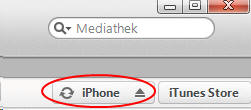
1. Click at at your iPhone, iPod or iPad
2. Select 'Summary'

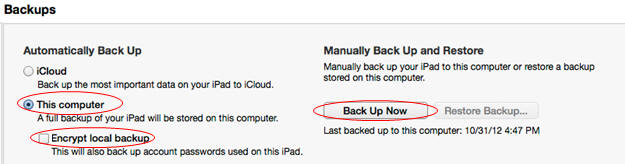
3. Create Backup
Make sure
- 'This computer IS selected
- 'Encypt local backup' IS NOT selected
Then click at 'Back Up now'
iTunes 10
1. In iTunes click at the iPhone, iPod or iPad:

Transfer an iTunes backup from another PC or Mac:
You can save a backup at any other computer or Mac. Then copy the backup files e.g. to an USB stick and then plug in that USB stick to the computer Mobile Master is running at.
On Windows 8/7/Vista the backups are stored in
C:\User\[your user name]\AppData\Roaming\Apple Computer\MobileSync\Backup
on Windows XP
C:\Documents and settings\Application data\Roaming\Apple Computer\MobileSync\Backup
ON a MAC Backups are stored in
[Username]\Library\Applications Support\MobileSync\Backup
Copy the newset folder (or all folders) to an USB Stick. connect that USB stick to the computer Mobile Master is running at.